


Bigo Live - Live Streaming App
4.5101.24K Reviews
App Specs
- Version
- 6.53.1
- Updated On
- License
- Free
- Downloads
- 500,000,000+
- Developer
- Bigo Technology Pte. Ltd.
- Categories
- Social
- Platform
- Android, iOS
Screenshots
 Analysis by AppCompare
I find Bigo Live most interesting when I treat it less like a video library and more like a room that is already in progress. A live broadcast can be a quick diversion, a chance to see how people share a hobby, or a way to try hosting a conversation myself. That immediacy is the appeal, but it also means the experience depends on who is broadcasting and what is happening when I open the app. It is not the best fit if I want a carefully edited video that will be just as easy to find tomorrow.
What the current version is built around
Bigo Live is a free social app from Bigo Technology Pte. Ltd., centered on watching live creators and broadcasting to an audience. Its current version is 6.41.2, and it runs on Android 6.0 or later. The app has a Teen content rating, so I would still approach public broadcasts with the same judgement I use on any social platform: content and interactions can vary, and a rating is not a promise that every stream will suit every viewer.
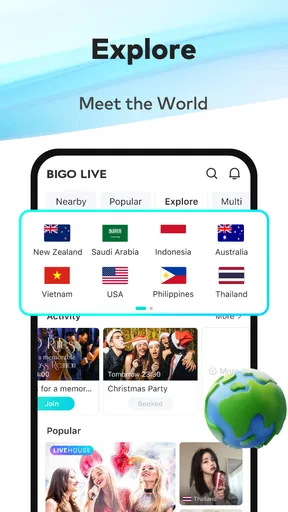
The scale gives new users plenty to explore: it has over 500 million installs and a 4.5 average from around 6.3 million ratings. That breadth can make the opening feed feel busy rather than personal. I would use search and the available discovery areas deliberately instead of expecting the first screen to immediately reflect my interests. When I find a broadcaster I enjoy, returning to that person is more useful than endlessly sampling whatever appears next.
Guides and Analysis on Bigo Live - Live Streaming App
There is also a practical distinction between watching and participating. Watching lets me dip in without preparing anything; hosting means I need a topic, a comfortable setting, and a willingness to respond while people arrive and comment. If I am testing the waters as a creator, I would start with a short, low-pressure stream rather than planning a long show. That makes it easier to learn how the audience behaves and whether live conversation feels enjoyable to me.
How the older release date fits the present experience
The app first appeared on March 10, 2016, so it is not a new experiment in live social video. The current version number shows that it has continued to receive version changes, but a version number alone does not tell me which screens or tools changed, or whether a particular feature is new. I would not treat the current build as proof of any specific redesign. What matters to me as a user is whether the parts I rely on—finding broadcasts, joining a conversation, and managing my own session—feel clear on my device.
For someone who already uses Bigo Live, a sensible way to approach a new version is to check the app after updating and revisit the sections used most often. If a control has moved or a screen behaves differently, taking a moment to explore before going live is better than discovering the change in the middle of a broadcast. New users have less to unlearn, but they still benefit from getting comfortable with the viewing and messaging areas before trying to host.
Where I would draw the line
The social energy is also the main trade-off. A busy live platform can surface broadcasts I would not have chosen, and open-ended browsing can eat into time without giving me much in return. I would use it with a purpose: look for a particular kind of creator, stay for a conversation that is genuinely engaging, then leave rather than treating the feed as something I need to keep checking. If I want quiet, predictable viewing or a polished series, an on-demand video service is a better match.
Worth Reading Before You Choose

Flipboard Shows What News Apps Must Do Beyond the Feed

Switching to Android Auto Means Rethinking Your Driving Routine

Google Calendar Makes a Crowded Week Easier to Manage

Ludo King Makes the Most of the Minutes Between Plans

Baby Panda World Brings Quick Play to Modern Phones, but Its Game Library Feels Busy

ESPN’s Live Game View Makes Following Close Games Easier
In-app purchases range from $0.07 to $399.99 per item, so I would be cautious around optional spending, especially virtual gifts. A gift can work as a visible way to support a broadcaster, but it is not required to watch or take part in the basic social experience. I would decide on a spending limit before browsing if I know I am prone to impulse purchases. The free entry point is useful, but it should not be mistaken for a guarantee that every form of participation costs nothing.
First Impressions
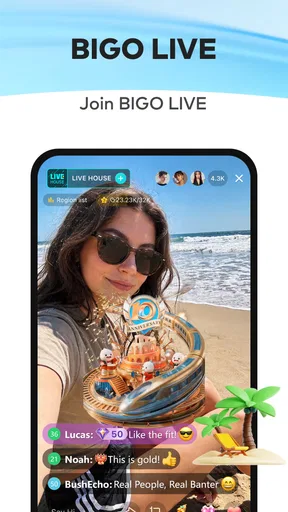
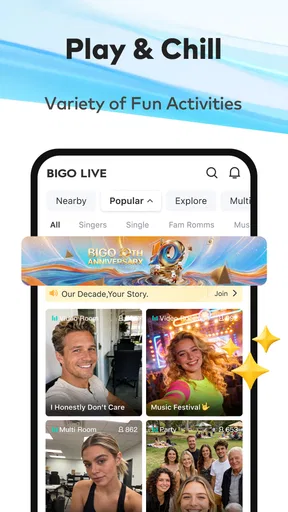
When I first opened Bigo Live, I was greeted with a bustling home screen filled with live streams from all over the globe. It's vibrant and a bit overwhelming at first, but in a good way. You can find everything from gamers streaming their latest conquests to singers showcasing their vocal chops. The app’s interface is intuitive, making it easy to find what you're looking for or discover something new.
Features Galore
One of the best things about Bigo Live is its array of features. You've got live streaming, sure, but there's so much more. Users can host their own streams, interact with viewers through comments, and even send virtual gifts. There's a real sense of community here. If you're into gaming, you'll love the dedicated gaming section where you can stream your favorite games or watch others play.
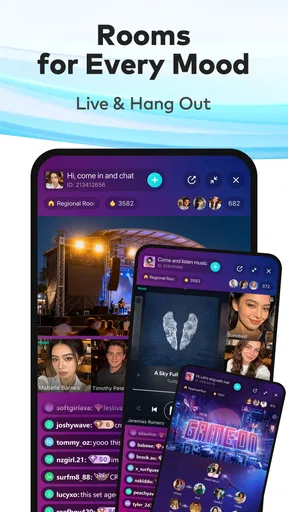
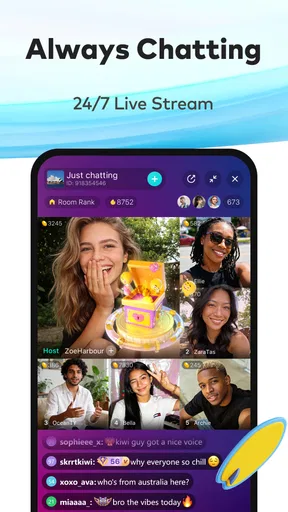
Another cool feature is the "Multi-Guest" room where you can host a live chat with up to four friends. It's like having a virtual hangout session with the squad, no matter where they are. Plus, the app supports real-time interaction, so you can chat with friends and viewers without missing a beat.
User Experience
Navigating through Bigo Live is pretty straightforward. The app’s design is sleek, with easy access to different sections like "Live", "Explore", and "Messages". The search function is a handy tool for finding specific content or broadcasters. What stood out to me was the quality of the streams. Whether I was watching a cooking show or a live concert, the video quality was consistently top-notch.
I also appreciate the app’s focus on user safety. There are strict community guidelines to ensure a positive environment, and the reporting feature allows users to flag inappropriate content. It's nice to know that the folks behind Bigo Live are actively working to keep the platform safe for everyone.
Final Thoughts
All in all, Bigo Live is a fantastic app for anyone looking to connect with a global audience or just enjoy some live content from the comfort of their home. Whether you're a creator eager to share your talents or a viewer looking for entertainment, there's something here for you. The app's extensive features and user-friendly interface make it a standout in the world of live streaming.
If you haven't tried Bigo Live yet, give it a shot. It's free to download and easy to get started. You might just find your new favorite pastime or discover a hidden talent you never knew you had. Happy streaming!
A realistic way to use it day to day
Suppose I have a little time after dinner and want company while I unwind. I can open the live feed, search for a subject I care about, and watch for a few minutes before deciding whether the host’s style suits me. If chat is lively, I can contribute a short comment; if the room is not what I hoped for, I can leave without having committed to a full video. That small, reversible choice is one of the app’s practical strengths.
For a creator, the same evening might look different: choose one clear subject, check the framing and sound before starting, and keep the first session short enough to manage comments comfortably. Live broadcasting rewards responsiveness more than elaborate editing. I would avoid trying to perform several tasks at once, particularly when learning the interface, because reading chat while staying on topic is its own skill. A simple theme—sharing a song, discussing a game, or answering questions—gives viewers an easy reason to join in.
Finding a room that is worth your time
Search is more useful when I use a specific interest or broadcaster name than when I browse without a plan. A broad feed is good for surprise, but it can make very different kinds of streams compete for attention. I would sample a few rooms, notice whether the host welcomes conversation and whether the pace feels comfortable, then follow the people I genuinely want to see again. That creates a more intentional routine than relying on whatever happens to be prominent at the moment.
There is a small etiquette benefit to watching first before commenting or sending anything. Each room has its own rhythm, and a brief look tells me whether the host is answering viewers, focusing on a performance, or running a group conversation. In a multi-guest room, the discussion may already have several voices; a concise comment is often easier to fit than a long explanation. The feature is best understood as a shared live hangout, not a private call with guaranteed uninterrupted attention.
How it compares with other ways to watch and share
Compared with YouTube Live, TikTok, or Instagram Live, Bigo Live puts the live social encounter at the center of the experience. The familiar alternatives may be more convenient if my audience already follows me there or if I want live video as one part of a broader creator routine. Bigo Live makes more sense when I want to browse a dedicated stream environment, discover broadcasters beyond my existing contacts, or join a room where live interaction is the point. I would not assume that a following automatically transfers between services; a creator starting here may need to build a community from scratch.
It also differs from on-demand platforms in a way that matters. A recorded video can be paused, revisited, and chosen for its finished structure; a live stream is spontaneous, and the best moment may depend on arriving at the right time. That makes Bigo Live more like dropping into a gathering than selecting an episode. If I need a searchable archive, a lesson I can replay, or a tightly edited performance, I would choose another format. If I want the possibility of a direct exchange with the person on screen, live streaming has the edge.
One useful compromise is to decide what I want before opening the app: casual entertainment, a particular creator, or a chance to talk. That intention helps me judge whether a room is serving me rather than drifting through stream after stream. It also makes it easier to stop when the content is no longer interesting. The app’s open-endedness is enjoyable in short visits, but less helpful when I am trying to protect focused work or settle down without more stimulation.
Practical boundaries for viewers and hosts
For viewers, the first question is whether I am comfortable with live content that cannot be previewed in the same way as a finished video. I can leave a stream that feels unsuitable and use reporting tools for content that crosses a line, but those actions do not make every room predictable. I would be especially thoughtful about sharing personal details in public chat. A lively conversation can feel familiar quickly, yet it remains a public social space.
For hosts, the important choice is not only what to broadcast but how much attention to give the room. Comments and guests can make a stream feel welcoming, while also pulling focus away from the original topic. I would set a simple boundary—such as keeping the session centered on one subject—and explain it in conversation if needed. If I do not want to speak spontaneously or handle an unpredictable audience, a recorded post or a smaller private conversation is likely a better option.
Parents and younger users should also take the Teen rating as a starting point for judgement, not as a substitute for sensible supervision. Social platforms bring together content and people with different expectations. I would talk through privacy, respectful chat, and spending before a young person uses interactive features, rather than assuming that a content label answers every practical question.
What to watch as the app evolves
The long-running release history and current version suggest an established product that continues to change, but I would judge future changes by their everyday effect rather than by a higher version number. For regular viewers, useful improvements would be those that make discovery more relevant and room controls easier to understand. For hosts, clarity around managing a live conversation matters more than a screen that merely looks newer. Those are the areas I would pay attention to as I keep using the app, without assuming any particular update is already on the way.
Overall, I would recommend Bigo Live to someone who enjoys live personalities, spontaneous conversation, and the possibility of being part of a room rather than just watching a finished clip. I would steer away anyone who wants a quiet, tightly curated viewing session, dislikes public interaction, or is uncomfortable with optional virtual-gift spending. Used with a clear purpose and sensible boundaries, it can be an entertaining social stop; used on autopilot, its crowded feed and open-ended format can become more distracting than rewarding.
Pros
- High-quality video streaming available.
- Supports real-time interaction with viewers.
- Diverse content across various categories.
- User-friendly interface and navigation.
- Regular updates improve app performance.
Cons
- Consumes a lot of data when streaming.
- Can drain battery quickly during use.
- In-app purchases can be pricey.
- Some content may be inappropriate for minors.
- Occasional lags during peak times.
FAQs for Bigo Live - Live Streaming App
What is Bigo Live and how does it work?
Bigo Live is a live streaming platform that allows users to broadcast real-time video content to a global audience. Users can showcase their talents, share experiences, or simply interact with viewers through live chats. The app also offers features like virtual gifts, game streaming, and video calls, making it a versatile tool for both creators and viewers.
Is Bigo Live free to use?
Bigo Live is free to download and use, but it offers in-app purchases for virtual gifts and premium features. These purchases can enhance the user experience by allowing users to support their favorite broadcasters or access exclusive content. However, basic streaming and viewing are available without any cost.
What age restrictions does Bigo Live have?
Bigo Live is designed for users aged 17 and above. The app contains live content that may not be suitable for younger audiences, so parental discretion is advised. The platform also employs moderation tools to help maintain a safe environment, but users should be aware of potential exposure to mature content.
How can I ensure my privacy on Bigo Live?
Bigo Live offers several privacy settings that users can adjust to control their visibility and interaction with others. Users can choose who can view their streams, block unwanted interactions, and report any inappropriate behavior. It's important to regularly review and update privacy settings to ensure a secure experience.
What are the key features of Bigo Live?
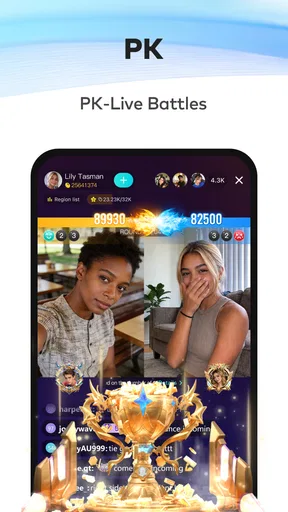
Bigo Live offers a variety of features, including live broadcasting, virtual gifts, video calls, and game streaming. Users can also join live chat rooms and participate in live battles with other broadcasters. These features are designed to create an interactive and engaging experience for both streamers and viewers.


